

YouTube is trying its own version of Spotify “Wrapped,” but with all of the videos you binged over the last year. It’s rolling out for more users – here’s how to find and watch your YouTube Recap.
YouTube Music has done something similar in the past under a similar name. YouTube’s version is based on the video aspect of content, offering up a summary of users’ YouTube history pathway through 2025. The rerun will come in the form of 12 cards that highlight your favorite channels, topics, and viewing habits, similar to what other apps do at year’s end, like Spotify.
Though it’s different from YouTube Music’s summary feature, users who have listened to at least 10 hours of music through YouTube will see those artists and songs added to the YouTube Recap.
YouTube Recap is starting to appear for more users to watch as the feature rolls out.
How to find your YouTube Recap
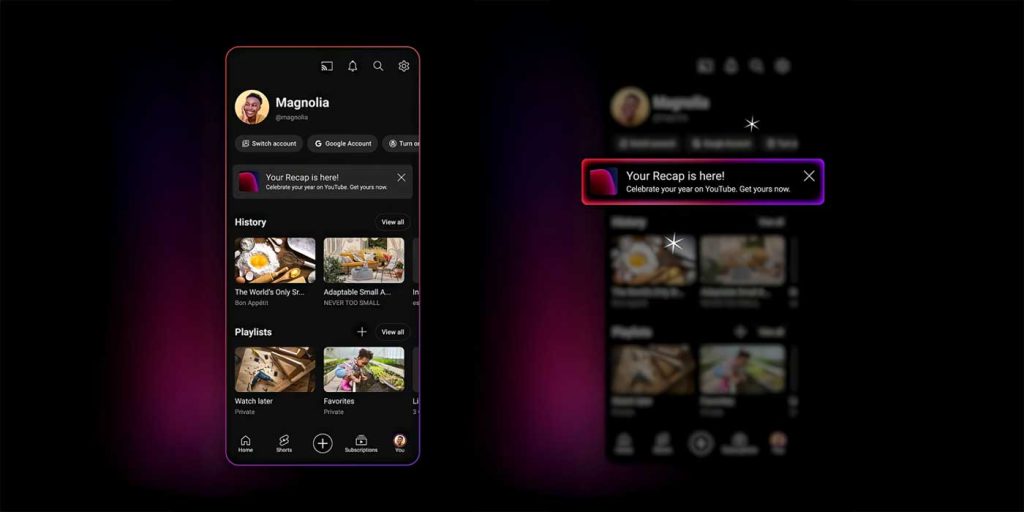
YouTube isn’t hiding the Recap feature, so it’s rather easy to find in the app.
- Head into the YouTube app.
- Tap You at the bottom.
- Tap You Recap is here!
- Note: Users can visit their recap on the web by heading to youtube.com/recap.
YouTube notes users can share individual recap cards through the app by hitting the share button at the bottom. The entire recap will be available through to the end of the year through the same method listed above.
The video platform also specifies that users under the age of consent will not get a Recap, nor will the feature roll out in all regions and languages.


FTC: We use income earning auto affiliate links. More.




Comments