


Samsung is now at its third generation of flagship foldables, and the Galaxy Z Fold 3 is the pinnacle of its achievements to date. Between better, more durable hardware, evolving foldable technology, and prices that keep inching their way down to sanity, the Fold 3 is a showcase for refinement in this field. But is it ready for the average customer?
Hardware
Expectations are finally met
The biggest story around the Galaxy Z Fold 3 is its physical hardware, because it’s a feat Samsung should truly be proud of. Like its smaller, cheaper sibling in the Flip 3, the latest Fold is water-resistant to the tune of any other flagship smartphone. It carries an IPX8 water resistance rating which means this phone can take a dunk, or technically even a swim in freshwater without dying on the spot. This newfound durability, though, isn’t one users should necessarily put to the limits. To pull off water resistance on a foldable, Samsung had to get clever.
What does this IPX8 rating mean in real life? Over the past two months using the Fold 3, I’ve become just that much less worried about damage while I’m out. With the Fold 2 I used over the past year, I was much more likely to grab a different phone if I was going out to do something where water might be a part of the equation – a luxury most people buying a phone of this price do not have. This year, I’m taking the Fold out on bike rides where I know I’ll have to traverse through a bit of water, and I’m not so worried about taking it out when it might rain or when I’m visiting a friend’s pool.
Water resistance, though, does not equal dust resistance. The “X” in that rating means the Fold can still let a bit of dust into the assembly if things go wrong. I’d argue, though, that this issue is relatively moot. The brushes Samsung uses on the hinge of the Fold 3 and its other foldables have shown quite clearly that dust is usually not an issue in all but the most intense scenarios. I’m happy to say that two months in, dust has been an afterthought on my device.

The other refinements Samsung has made on the Galaxy Z Fold 3 may also be lost to a newcomer, but they show the company’s progress is making these phones ready for new people to jump on board. The Fold 3 is a bit easier to open compared to the Fold 2, and its hinge doesn’t seem to be wearing in at the same speed as my Fold 2 did last year. This means Flex Mode tricks (where the hinge holds its position) still work as intended and there’s still a good amount of resistance when opening and closing the hinge.
The design, too, has evolved nicely over the past three generations. This year, the Fold 3 is all matte, which feels great in the hand and looks visually stunning, especially in the “Phantom Silver” variant. Little tweaks, such as making the camera module smaller and rounded, also help make this phone more appealing.
The screen feels better than ever, but with a lurking issue
In terms of day-to-day usability, the biggest refinement is probably to the display. That’s not because of the panel underneath, but because of the layer on top. The pre-installed, and supposedly necessary, screen protector feels just like glass this year. It has an oleophobic coating that hides fingerprints well and, even two months in is just pleasant to use every day. The biggest difference between this plastic outer layer versus traditional glass is that you might notice it’ll hold onto dust a bit more, and of course that it might pick up little scuffs and scratches more willingly. That said, the Fold 3’s inner display still looks just as flawless as the day I unboxed it, so Samsung has definitely made a lot of progress in this regard.
Unfortunately, the layer underneath remains the same. Samsung is still using the same ultra-thin glass under the protective top layer – which comes with its own set of pros and cons. The more stable layer does elevate the experience of using this foldable and adds a bit of durability to the assembly and prevents damage to the display. However, ultra-thin glass is still glass, and glass breaks. As evidenced by my recent encounter with the Galaxy Z Flip 3 as well as many online examples, ultra-thin glass still appears to be susceptible to breaking more easily, and sometimes unexpectedly. Thankfully the glass on both my personally-purchased Fold 3 as well as a review unit from Samsung remains intact to this day, but I’d call this layer a valid point of concern, and definitely an encouragement to get a stronger warranty on the device, whether that’s Samsung’s own Care+ or something third-party.
The other, in my opinion, minor concern comes from the unavoidable nature of a foldable – this phone is thick when closed. The Galaxy Z Fold 3 is roughly twice as thick as your average smartphone, give or take a few millimeters. Personally, I haven’t had much of a problem with that. It still slides into my pocket just fine, and I think the added thickness comes as a benefit when using the outer screen one-handed. However, there are times it becomes a bit more cumbersome. For example, I had a hard time finding a bike mount for my phone because of its thickness, and with the added thickness of a case, it just barely fits properly.
The hardware of the Galaxy Z Fold 3 is a place where you can’t just look at the present because this is still a new technology that’s constantly evolving. Three years in, Samsung has learned a lot about what its customers need and what the company itself is capable of cramming into this device. The Fold 3 is a showcase of those achievements, both good and those still in progress. It’s also the first Fold that, from a hardware perspective, has enough important pros that people can overlook the smaller cons if they really want to invest in this device.
Display
Inner Display: Refining the formula of its leading feature
But of course, the story doesn’t stop at hardware. The displays are the most crucial part of the Galaxy Z Fold 3 because they are, after all, the whole reason to buy this device.
Starting with the inner display, the Fold 3 is using a 7.6-inch panel that has an unorthodox 11.2:9 aspect ratio. While a bit weird with apps, as we’ll get to, that display is bigger and wider than what you’d get on any other pocketable device, and the quality of the panel is also much better this year.
Samsung is using a new display tech this time around that uses some clever ideas to produce a panel that’s brighter (peak brightness has been measured at a little over 700 nits) for the user while being less impactful on the battery. In day-to-day life, that upgrade is appreciated, as the Fold 3’s display works wonderfully both indoors and out. It has enough range to battle direct sunlight yet not blind me while scrolling social media or doing some reading late at night in bed. The 120Hz refresh rate is also just as appreciated as always.
The one really new thing about the internal display, besides the aforementioned screen protector, is the under-display camera. The 4MP sensor sits below a thinned-out OLED array, allowing it to disappear behind content when it’s not needed, or take a shot/video call when you want. It’s a great idea in theory, but even two months in I stand by my original stance – this under-display camera is bad. The OLED thinning is still very ugly to look at and can be distracting at times, and it also makes the camera’s quality quite awful. I’ll admit it’s not something that annoys me on a daily basis anymore, with the section mostly being forgotten in normal use, but occasionally it makes itself known and it’s just a little bit annoying. To an extent, I’d still prefer Samsung stick with a traditional hole-punch camera, but there is one benefit I’ve come to appreciate. Because the camera is technically behind a display, Android no longer treats it as a “notch,” meaning you do get that screen real estate back in instances such as movies and games.
It’s hard to decide if the under-display camera was a worthy inclusion on the Fold 3, especially since it undoubtedly drove up the cost, but it’s an inclusion that doesn’t really have a deal-breaker. At worst, it’s a minor annoyance, at best, it’s something you’ll come to appreciate.
Outer Display: Making the best of needed limitations
Then, of course, there’s the outer display. This tall and slim panel leaves a strange first impression for many, but after a year on the Fold 2 and a couple of months on the Fold 3, I can’t disagree with the haters more. The outer display on the Galaxy Z Fold 3 is pretty darn amazing. The slim nature of the panel means it’s brilliant for one-handed use, especially with the thicker design of this device. Being so tall means it doesn’t give up too much screen real estate either. It takes a little while to get used to the aspect ratio, sure, but it’s far from a deal-breaker. In my opinion, it’s an actual positive of this device, and it’s one I use remarkably often.
My usage of the Fold 3 is probably split around 50/50 in terms of screen time, with the outer display probably being used more often than the inner one, just for shorter bursts. The outer display is great for quickly scanning an email, shooting off a tweet, keeping up a shopping list while at the store, and of course for taking a phone call. The 120Hz refresh rate added to that outer panel this year also makes all of that a bit more pleasant on this model versus older generations.
Plus, the Fold 3’s outer display takes on new importance on this year’s Fold. Since the internal selfie camera is hindered by the display, the outer display becomes much more crucial for capturing selfies, since it uses a traditional hole-punch style camera.
Unfortunately, as with the Fold 2, both devices suffer from software optimization issues. In short, apps on the outer display often feel cramped, and sometimes elements of the screen end up getting cut off as a result, which is not a nice experience at all. Meanwhile, the Fold 3’s inner display suffers from fewer issues, but still occasional hiccups. Some apps just don’t scale well to the aspect ratio, but we’ll get to that in a minute.
Software
Samsung’s solid One UI tries to address Android’s tablet problem
In terms of the software experience, the Galaxy Z Fold 3 runs atop Android 11 with Samsung’s One UI skin. The look of the software will have its fans and its haters, but personally, I’ve fallen into the camp of rather enjoying it. One UI is messy at times, but in daily use, I find that I settle into a workflow that ignores many of these issues. Sure, there are duplicate apps, Samsung’s Internet browser is as invasive as Edge on a Windows computer, and the Settings menu often feels like a maze, but there are plenty of pros to outweigh those cons.
The first area you’ll see advantages to Samsung’s software on the Fold 3 is in tablet optimization. The inner display can truly be treated as a tablet this year thanks to a tweak to the DPI which triggers more apps to show a tablet UI on this screen. While this isn’t always present, when it happens it feels like the device is really taking advantage of its larger canvas. Samsung’s apps, which admittedly I sparsely used, are an especially good example of this with split panes. You can see this below in the Settings menu which shows sections on the left and options on the right.
Samsung took this effort a step further with its various “Labs” features (Settings > Advanced Features > Labs) that do even more to improve how the Fold 3 takes advantage of its screen. The first of these features is the “taskbar” along the side of the display, which can show a handful of apps of your choice and pin them to the side of the display. This effectively mimics the look and feel of a traditional Windows/Mac computer. This is a feature I don’t often keep enabled, but if you’re a heavy multitasker it’s perhaps the most useful feature on this phone. Switching between a handful of apps with this sidebar is incredibly quick and easy, and it’s especially handy with the S Pen.
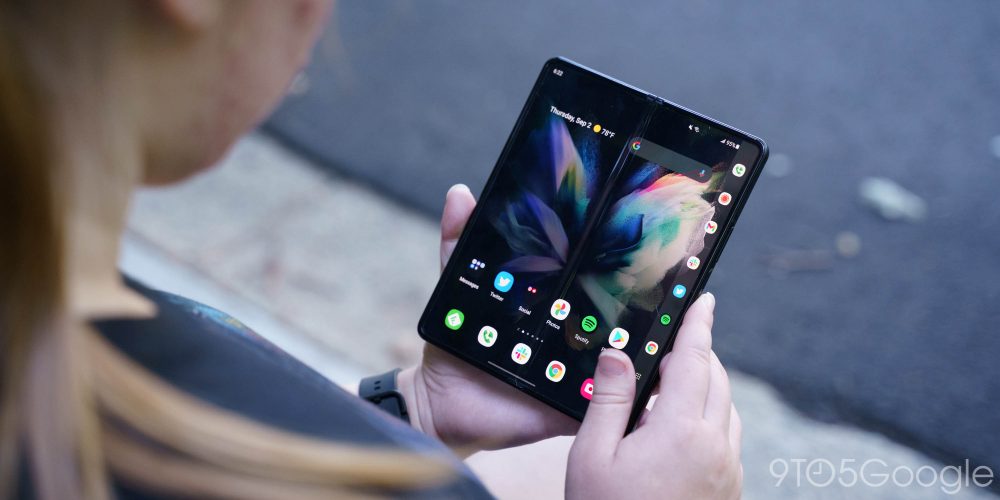
The “Labs” section also addresses the scaling issues found in a lot of apps. Some won’t take up the full canvas inside, like Instagram. An option within the settings allows users to force apps to a certain aspect ratio, whether that’s to take up the full display or to shrink to a slimmer size to keep visual elements intact. Personally, I’m usually fine with how apps are displayed by default, but there are scenarios where this comes in handy. For instance, Accuweather is my weather app of choice, and it looks horrid on the inner display by default, so forcing it to a slimmer aspect ratio makes it much more useful on that display.
Beyond those experimental, disabled-by-default options, One UI also ensures there are plenty of options for multitasking. You can use traditional top/bottom split-screen, or split apps down the middle and have them side by side, even adding a third to the mix. On top of that, you can have a fourth floating window. And you can do this all at once to have four apps actively displaying on the inner screen. You can get a lot done with this phone, but just like with the Fold 2, I didn’t find myself digging into that functionality all that often. Multitasking, at least for me, is a capability that’s useful from time to time, but most often I found myself enjoying this bigger canvas just to see more content at once, or to get more done if I’m typing out a long email or jotting down ideas.
The best part of One UI in 2021 is that finally, the evil of ads seems to be going by the wayside. Samsung has removed ads from the places they were primarily seen, including the Weather, Pay, Health, and other apps that ship on the phone by default. Better yet, I haven’t been sent any notifications with ads from Samsung since using the Fold 3.
Updates are an advantage of Samsung’s software, too, as the company is pretty good about rolling out security updates on a very timely basis. Since the August release, my Fold 3 has already picked up two security patches for September and October. Going based on last year, Fold 3 will likely lag behind by a few months for Android 12, but the phone will still get a couple more major updates after that and security patches through the next four years.
Rounding things out with performance, it’s obviously pretty admirable. The Galaxy Z Fold 3 has the same Snapdragon 888 and 12GB of RAM as the powerhouse Galaxy S21 Ultra, and the specs really do translate to excellent performance. I did note some stutters from time to time seemingly at random that I hadn’t noticed on other recent Samsung releases, but patches rolled out over the past two months seem to have addressed that issue.
S Pen
A welcome addition, not a selling point
Despite dealing with a screen that folds and isn’t coated with thick glass, Samsung managed to get its signature S Pen from the Galaxy Note series working on the Fold 3. The technical and functional aspects of this are interesting, but this is not a reason to buy the phone. The S Pen on the Fold 3 is a useful add-on, not a core part of the device. The S Pen is a separate purchase and it doesn’t sit well with the device. Samsung’s official solution for carrying the two together is laughable.
In my own use, I found the S Pen to be something I rarely used. Keeping it handy was just a bit cumbersome. The Fold 3 is a big phone in my pocket, and between keys, a wallet, and earbuds on the other side, I just don’t want to add a stylus to that mix on a regular basis. I only really grabbed the S Pen if I knew clearly how I planned to use it, whether that’s highlighting some text while reading, drawing sketches, or using it for some precision multitasking. But those occasions just aren’t really that common, at least for me. All of the software elements that make the S Pen so great are on the Fold, but the physical silo that made it so convenient on the Galaxy Note isn’t, which makes it an afterthought.
That said, I have to give Samsung a lot of credit for making this work at all. It’s an impressive technical feat to be able to use a stylus on a screen like this, especially when the digitizer technically doesn’t cover the center of the screen. Rather, the Fold fills in the gap with clever software that I found very accurate. The crease, too, didn’t feel like a hindrance with the S Pen. Samsung designed its special “Foldable Edition” S Pen to retract the tip when pressure is applied, but I struggle to see how effective that would be. The amount of pressure that needs to be applied to have that spring kick in would almost certainly hurt the screen, but I guess it’s better than nothing.
Battery Life
Not exactly a strong point
If I had to point to one negative aspect of the Fold 3 – beyond its price – it would probably be the battery life, which has not been ideal. The 4,400 mAh cell is smaller than what was the already middling Fold 2’s battery, so the story here was never going to be great.
With my mixed usage of the Fold 3’s two displays, both set to 120Hz, on average I’ll make it through a full day of use with around 3-4 hours of screen time between 8 a.m. and 11 p.m. However, I’m usually reaching for a charger around 7 p.m. to give a quick boost to the battery before I use it through the evening, especially if I plan to squeeze in a quick session on Stadia or Game Pass before bed. It’s rare that I feel battery anxiety around this device as I sometimes did with the Flip 3, but it’s not exactly an endurance champion either.
If strong battery life is something you need in a phone, I can’t recommend the Fold’s endurance. However, if like most folks you have a chance to throw it on a charger during dinner or plug it in for 15 minutes on the commute home, I think it will hold up just fine for your needs.
Cameras
Fine… on the outside
The Galaxy Z Fold 3 has a total of 5 cameras. There are three primary cameras on the back, all 12MP, for standard, ultrawide, and 2x telephoto shots.
The primary cameras are, for the most part, fine. As usual with Samsung the performance can be a bit inconsistent, sometimes leaving you with a worthless shot unexpectedly. Other times, though, it can power through and produce a stunning shot, especially outdoors. The 2x telephoto is a bit disappointing compared to the killer S21 Ultra, but it gets the job done for the most part.
It’s on the selfie cameras where the Fold 3 falls a bit flat. The 10MP selfie shooter on the outer display is fine under good lighting, but is easy to stumble. Luckily, a better shot is just a fold away as you can use the rear cameras with the outer display to get a much better quality shot. The inner selfie shooter, though, is just a mess. The 4MP sensor is hidden under a thinned-out OLED panel and it shows (pictured above). Shots are muddy and dull, and Samsung’s software enhancements don’t always deliver something salvageable. Worse yet, they only work with still images. A poor camera inside can be forgiven as you’ll usually only use it for video calls, but the results there are rough. As mentioned, I wish Samsung had either stuck with a hole-punch inside or just omitted the camera entirely and passed the savings on to the final price tag.
Final Thoughts
Closer to reality
Foldable smartphones once seemed like a futuristic dream, but if there’s anything Samsung has proved this year it’s that these phones are closer to reality for a lot of people. Price, I’d argue, is the biggest thing standing in the way of a Galaxy Z Fold 3 in the hands of a lot of people. Even broken up into monthly payments, $1,799 is just a hard pill to swallow. To Samsung’s credit, the offers for trade-ins are phenomenal, and the price is going to be worthwhile for many people, but it’s still very expensive.
And the other tough part is that foldable smartphones just aren’t quite done baking yet. Durability has come an incredible way in the past 3 years, but Samsung still needs to work on the ultra-thin glass and, more importantly, its service options. Almost any major damage to a Galaxy Z Fold 3 will require shipping the phone off to Samsung for repair – the company is technically partnered with Asurion (uBreakiFix) for repairs, but some matters are just out of those store’s hands – meaning you’re left without your phone for days on end. This is a problem Samsung needs to fix.
That said, this is the first year where I can say it’s reasonable for people to consider the Fold model. The software and the hardware are up to the task, as long as you’ve got deep enough pockets and probably a backup phone handy just in case anything goes wrong.
If you want to pick up the Fold 3, the best deals will be at Samsung.com, but you can also buy the phone through Amazon, Best Buy, and major carriers including Verizon, T-Mobile, and AT&T. We’ve already seen sales that take a chunk out of the price, too. At the time of publication, some retailers have the Fold 3 for $1,599.


FTC: We use income earning auto affiliate links. More.



Comments